Run your department from your own Microsoft 365 cloud.
You've been auditing it — why not get the benefit of using it?
UnifiedAudit gives your team and your managers one current picture of every engagement — work papers, evidence, findings, and timekeeping in one place, instead of scattered across desktops and chased down the hall. And because it all runs inside your own Microsoft 365 and Azure tenant, that single source of truth never leaves the environment you already control.
Everyone sees the same audit — while it's happening, not after.
When the work lives in one place the whole team trusts, status stops being something you chase down the hall. Auditors and managers share one current picture, start to finish.
Managers see where every audit stands
Real-time status across engagements — no more walking the floor to collect updates or piecing progress together from memory.
Work lives in the system as it's created
Papers, evidence, and findings go straight into UnifiedAudit, instead of parking on someone's desktop until an audit finally closes.
Nothing falls through the handoffs
Reviewers and auditors work from the same live state, so a finding raised today is the finding everyone sees — not a copy that drifted out of sync.
Authoritative documentation never leaves your organization's cloud.
UnifiedAudit runs on the Microsoft 365 environment your organization already governs and protects — so implementation does not require standing up a new home for your most sensitive work.
No new assessment to clear
It runs in infrastructure that's already in your control catalog. There's no third-party cloud to evaluate, approve, and re-review every year.
No cross-border data transfer
Work papers and evidence stay in your tenant's region, under the residency rules you've already set. Nothing leaves to be processed elsewhere.
No data-processing addendum
There's no external processor touching your data, so there's no DPA to negotiate and no new contract for legal to redline.
Work papers started vanishing, the team stopped trusting the system, and the audit scattered to everyone's desktop.
Our founder was a working auditor when their department's audit system was upgraded. Nothing broke all at once — but over the months that followed, work papers would quietly disappear. A file saved one week was gone the next.
Confidence drained fast. Staff began keeping their work papers in File Explorer on their own machines, copying them into the system only once an audit was finished. Safer for each person — but it meant no one could see an engagement while it was live. Managers learned where an audit stood by walking the floor and asking.
The real failure wasn't just reliability. It was cohesion: the work, the people, and the oversight had each drifted somewhere different. UnifiedAudit was built to bring them back together — one place the whole team can trust, where work papers live as they're created and everyone, auditor and manager alike, shares one current picture. Unified.
Shaped to your department's needs.
UnifiedAudit brings the whole audit into a single tenant-native platform — and your department decides how it's set up: where work is stored, which AI features run, and how your quality program is configured. Start lean, add more as your program grows.
Store your work the way your department chooses.
Your work papers stay in the Microsoft storage your organization already uses, protected by the same access rules, version history, and retention your IT team applies everywhere else. Your department chooses the setup — and no one has to learn a new place to keep the work safe.
SharePoint · Azure Blob · Azure SQLData Analytics Lite Interface — the tests you reach for, built in.
Run duplicate detection, gap and Benford analysis, fuzzy matching, aging, and sampling against an imported dataset — without standing up a separate analytics platform or exporting your audit data anywhere.
No export · no second toolSign in with the directory you already manage.
Entra ID single sign-on means no new accounts, no extra passwords, and access governed by the same groups and conditional-access policies you enforce everywhere else.
Entra ID SSOAI you govern — off by default, on only where you decide.
UnifiedAudit gives you control over where AI is used within the application, as well as whose AI you select to use. Because the AI workload is broken out by function, your department might want assistance writing issues — such as criteria lookups — but not aid in writing reports. UnifiedAudit gives you that control.
Disabled is the recommended default. Anthropic and Azure OpenAI are both available today — and Azure OpenAI keeps inference inside your own Azure subscription's region, the natural fit for shops that want AI to stay in-tenant.
Finding narrative assist Yellow Book
Takes your draft finding — Condition, Criteria, Cause, Effect, Recommendation — and tightens the wording. It sharpens what you wrote; it never invents facts or evidence, and you accept each field one at a time.
Work paper summary assist
Suggests a conclusion paragraph from a work paper, returned for you to review and edit.
Risk scoring assist
Suggests inherent and residual scores for a risk, with a one-line justification.
Executive summary draft
Drafts a closure summary from the audit objective and the list of findings.
Stakeholder communication draft
Drafts engagement letters and status updates from engagement metadata and stakeholder context.
Data analytics assist DALI
Explain what a DALI test flagged in plain English, set a test up from a plain-language description, or turn a finding into a draft observation.
An auditor has the facts of a finding, but the wording is rough. With Finding narrative assist switched on, the draft Condition / Criteria / Cause comes back tightened into clear, professional language in seconds — the auditor's own facts, sharpened, never invented — and each field is accepted or rejected line by line.
From risk to report, on a methodology that matches how internal audit actually works.
Every feature exists because an auditor needed it on a real engagement — not because it demoed well.
Risk & scope
Work papers
Evidence
Findings & issues
Report & track
UnifiedAudit quietly tracks what you're working on as you go. So when Friday's timesheet true-up rolls around, you're reconstructing your week from a record — not from memory — and the hours land on the right engagements.
Built around the Yellow Book — enhanced.
Your quality framework isn't bolted on at review time — GAGAS is wired into how UnifiedAudit works, from independence checks through three-tier work-paper sign-off, so conformance is a byproduct of doing the work rather than a scramble before peer review.
GAGAS conformance is built into the workflow — independence checks, three-tier work-paper sign-off, peer-review-ready organization, and an auditable change history — so meeting the Yellow Book is the system's default state, not a separate project.
Ready for the reviewer at the door
Engagements stay organized the way an external peer reviewer expects to find them, so review season isn't a scramble to assemble evidence after the fact.
Catch it before they do
Run ongoing internal inspections of completed work to surface gaps on your own schedule, not on an external timeline.
Your standards, applied consistently
Codify your quality-control policies in the platform so they're applied the same way on every engagement, instead of living in a binder no one opens.
An audit log that's itself auditable
Every change is recorded — who, what, and when — so the history of an engagement stays traceable and defensible long after it closes.
UnifiedAudit QM Essentials — audit quality management on one desktop.
A Windows app for audit shops that need the quality-management essentials without standing up a platform. It ships Yellow Book-ready for the 2024 GAGAS model, and the records translate to any audit standard — adopt them and tailor the language to your framework. The essentials: a risk-based quality-management register with a 30-objective starter pack, eight pre-written and fully editable QM policies, an annual quality plan tracked planned vs. performed, the annual evaluation with a signed quality-control report, CPE tracking against the 80/24 rule (and the 20-hours-each-year minimum), independence records at every level (per-engagement assessments, engagement-team statements, annual staff affirmations), the audit-committee roster and governance communications log, findings, peer-review and inspection monitoring, and a print-ready peer-review packet — all opening onto a dashboard that shows what needs attention. Everything is stored in a single file on your machine, snapshotted automatically at every launch, importable and exportable as Excel-ready CSV. Nothing leaves your desk.
$575 / year per audit shop — free while in early access. No card, no license key, no lock-in: we want it earning its place in your shop first, and your data is always yours.
Why now: under the 2024 Yellow Book, your first annual evaluation of the system of quality management is due December 15, 2026. QM Essentials produces that signed evaluation — and the register, written policies, CPE record, independence file, and peer-review packet behind it.
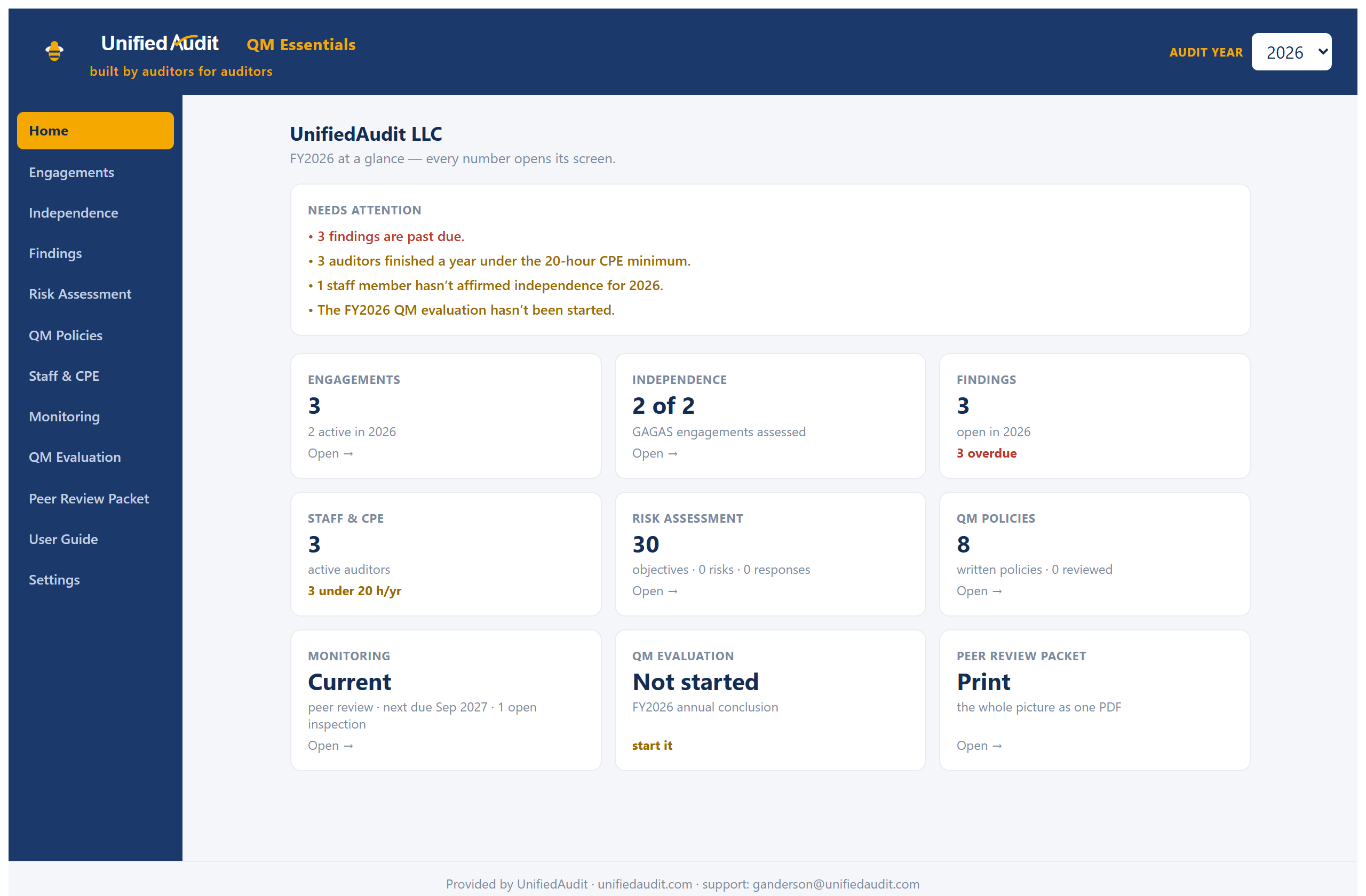
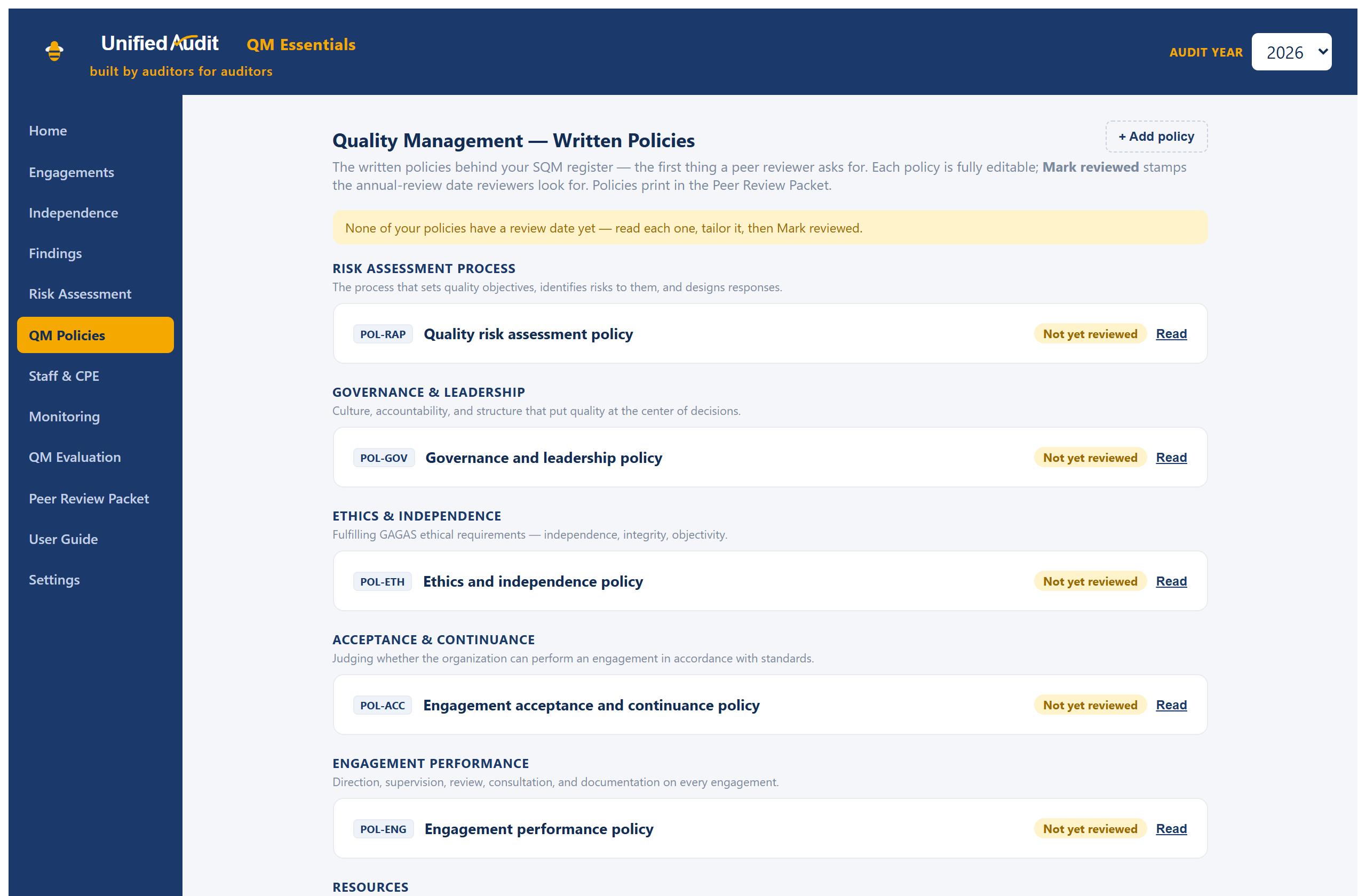
See the deliverable first: a sample Peer-Review Packet (PDF) generated by the app from example data — the one document that shows your reviewer the whole quality system.
Every download is digitally signed — the installer shows
Verified publisher: UnifiedAudit LLC (right-click → Properties → Digital Signatures to inspect).
Download it only from this page, and verify it if you like (we would):
Get-FileHash .\UnifiedAudit_1.9.3_x64-setup.exe should match the
published SHA-256 checksums. Installing shows the
license (third-party notices).
Your data stays in a local file on your computer and is never transmitted. When your shop outgrows the desktop,
the UnifiedAudit platform is the same thinking, live for your whole team.
UnifiedAudit DALI — audit data analytics, without the data science.
A Windows app for auditors who are not data people. Bring in the file you already have — a vendor master, a payments extract, a general-ledger dump — or pull it straight from PeopleSoft, Infor, Oracle or SQL Server, answer two or three plain-English questions, and get your exceptions. Every step is logged with the exact SQL that produced it, so a reviewer can reproduce the result years later.
$495 / year per seat at launch — free while in early access. No card, no license key, no lock-in. Your data stays in one project file on your own computer; DALI sends nothing anywhere.
Bring data in
CSV and text files of any size, Excel workbooks a sheet at a time, or a live pull through ODBC from PeopleSoft, Infor, Oracle, SQL Server, DB2 and more. A profile with control totals ties every import back to the source. A million-row file runs the whole suite in under a minute.
Eight tests, in plain English
Find duplicates · Find gaps in a sequence · Benford's Law · Age the items · Total by group · Band the amounts · Compare two lists for near-matches · Pull a sample. Filter rows, add a computed column or match up two datasets first when the population needs shaping.
Follow it through
Flagged rows become items in an exceptions register with decisions, notes and history. A pulled sample carries a testing worksheet that evaluates itself. Routines rerun your tests on fresh data on a Windows schedule and report what is new. Everything exports to Excel and Power BI.
Read first, if you like: the user manual (also built into the app) and the release notes.
Every download is digitally signed — the installer shows
Verified publisher: UnifiedAudit LLC (right-click → Properties → Digital Signatures to inspect).
Download it only from this page, and verify it if you like (we would):
Get-FileHash .\UnifiedAudit-DALI_0.4.3_x64-setup.exe should match the
published SHA-256 checksums. Installing shows the
license (third-party notices).
DALI makes no network requests at all unless you turn on check for updates, which reads one small version
file from this site and sends nothing about you or your data. Database passwords are never stored.
CapoPDF — the PDF editor built for audit evidence and work papers.
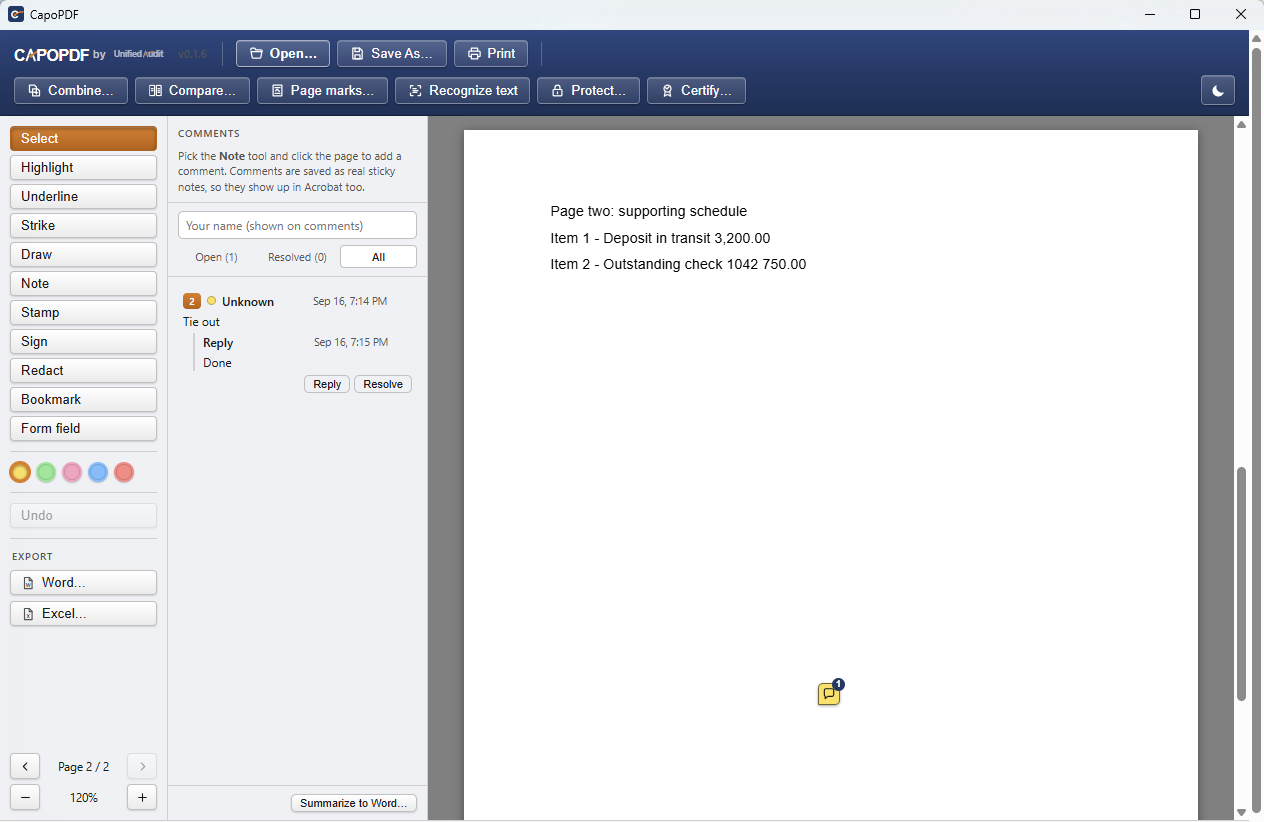
A Windows PDF editor for the things auditors actually do with a PDF: mark it up, bookmark the spot a reviewer needs to see, compare a revised paper against the original, sign it with a certificate, and get the text out into Word or Excel. It replaces the Acrobat seat most audit shops keep only for those jobs. It does not try to be a page-layout tool — if you need to rewrite paragraphs inside a PDF, that is a different product.
Free through December 31, 2027. No card, no license key, no account. It works on its own, and it is optimized for UnifiedAudit: sign in and it opens work papers straight from an engagement and checks them back in as a new version.
Mark up and comment
Highlight, underline, strike, draw, stamp, and sticky-note comments with replies and a resolved state — saved as real PDF annotations, so they read the same in Acrobat. Bookmarks drop a pin exactly where the reviewer should look.
Review and prove
Compare two versions side by side, word by word, or pixel by pixel for scans. Sign with a certificate from your Windows store, verifiable in any reader; the app tells you if a signed file was changed afterwards. Summarize every comment to a Word document for the file. Password-protect a copy with AES-256.
Get the content out
Find and copy text, export to Word or Excel, run Windows OCR on scanned pages so they become searchable, combine files, reorder and rotate pages, add watermarks, headers, footers and Bates numbers, fill forms or add your own fields. Nothing you open leaves your computer.
Known issue in 0.1.9: the Redact tool blacks out text on the page, but the original can still be recovered from the saved file. Don’t rely on it for anything leaving your office. A fix is in testing and will ship as the next release.
Every download is digitally signed — the installer shows
Verified publisher: UnifiedAudit LLC (right-click → Properties → Digital Signatures to inspect).
Download it only from this page, and verify it if you like (we would):
Get-FileHash .\ should match the
published SHA-256 checksums.
CapoPDF makes one small request on launch to check this site for a newer version (nothing about you or your files is sent);
every other network request needs you to sign in to UnifiedAudit first, and you never have to.
See UnifiedAudit running in a tenant like yours.
A short walkthrough, scoped to how your team works and where you need your data to live. No data leaves your environment to find out.
Schedule a walkthrough